
We do not sell products such as computers and peripherals. There are exceptions, naturally.
That is to say, we stock repair and upgrade items such as memory and hard drives. We do have a
small inventory of used computers and peripherals. Additionally, we stock a large inventory of
networking items: routers, repeaters, access points, firewalls, cables, wiring, power
supplies, connectors, fuses, and integrated circuits.
Memory
For most computers covering old and new prices vary and we stock many types
and brands. If you have your own memory, we will gladly install it for you.
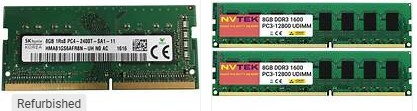
Computer memory can be complicated, and costly mistakes can be made. Primarily, they don’t work, or they
work but limit performance or capacity. If you are currently looking to upgrade
your desktop or laptop, check out compatible choices using
PC-building resources like Newegg or the Crucial Memory Advisor
Tool to ensure you buy the exact form factor and generation your
motherboard supports.
There are four basic categories to choose from. Save time by
letting us ensure you pick the right and optimal options for
your needs:
- DRAM (Dynamic RAM). DRAM is the primary memory in your
computer that temporarily stores data while the system is on.
It requires constant electrical refreshing to retain data.
DRAM is the primary memory in your
computer, temporarily storing data while the system is on. It
requires constant electrical refreshing to retain data.
DRAM (Dynamic RAM).
- DDR4 (Double Data Rate 4): The former
standard is still widely used in older desktop and laptop
systems. It runs at standard speeds, typically between 2,133 and
3,200 MTs (Mega-Transfers per second).
- DDR5: The modern standard for
high-performance computers. It provides higher bandwidth, better
power efficiency, and speeds starting at around 4,800 MTs and up
to 8,000+ MTs with overclocking.
- DIMM vs. SODIMM: DIMMs are larger RAM
sticks designed for desktop motherboards. SODIMMs are smaller,
compact modules built specifically for laptops and Mini-PCs.
- SRAM (Static RAM)
SRAM is significantly faster, more
expensive, and consumes less power than DRAM. Because it uses
multiple transistors per bit instead of capacitors, it does not
need to be refreshed.
- CPU Cache: Built directly into or placed
very close to the processor. It holds the most frequently
accessed data, so the CPU doesn't have to wait for slower main
DRAM memory
- VRAM (Video RAM)
A specialized type of RAM integrated into
your graphics card (GPU). It is highly optimized for rendering
heavy visual data, 3D graphics, and textures rapidly.
- GDDR6 / GDDR6X: The industry standard for
modern graphics cards, providing extreme bandwidth to process
high-resolution frames.
- HBM (High Bandwidth Memory): Advanced,
stacked memory used in high-end data centers and professional AI
GPUs.
- Specialized Memory (LPDDR)
- LPDDR4 / LPDDR5 (Low Power DDR): Soldered
directly to the motherboard. It is optimized for ultra-low power
consumption and is the standard memory in smartphones, tablets,
and lightweight, thin laptops.
If you are currently looking to upgrade your desktop or laptop,
ask us for no-obligation help with compatible options. Ensure you
buy the exact form factor and generation that your motherboard supports.
Hard Drives
Not required if you are fully wireless. However, there are many
exceptions. Cost very however in most cases, we come to your location
and perform the entire installation to your satisfaction. For most
folks what is most important is not seeing the cabling.
Networking Items